Product updatesRelease notes
What's new in the store builderClaude CMS Headless Ecommerce Release Notes
Improvements to the Claude CMS ecommerce store, listed as they ship. Everything here is part of the store builder plan and arrives in your account automatically, with nothing to install or upgrade.
Dropshipping New
Let your suppliers send orders straight to your customers. Link each product to the drop-shipper who sends it, with their own SKU and what they charge you, and your margin shows on every line. Open an order on Your Store → Drop-shipper products and press Send: each drop-shipper gets one email in your branding with only their items and the delivery address, and never the same order twice. The email carries an Add tracking button, so the carrier and tracking number come back onto the order, and if you choose, your customer gets an “on its way” email. Switch on automatic sending and new paid orders go out by themselves every few minutes, only those paid from that moment on. Everything goes out from your own email address. Dropshipping is being switched on store by store; ask us to turn it on for yours.
Newsletter manager New
Send newsletters to your customers from Emails → Newsletter. Build mailing lists that fill themselves from your website forms, store enquiries and the customers happy to hear from you, write a campaign in your own branding, send yourself a test, then send it straight away or schedule it in your store’s timezone. It goes out from your own email account, or through Amazon SES once your list outgrows a mailbox’s daily limit, both set up under Connections. Every email carries an unsubscribe link, opens are counted, and links back to your site are tagged so the visits show up in your analytics.
Invoices and packing slips you can edit New
Every order now comes with an invoice and a packing slip as PDFs, with your logo and the name and address from your Business Details at the top. Make the wording your own in Assets → Documents: the title, the invoice number prefix, your VAT or tax registration number, a note to the customer and the small print at the foot. Show or hide SKUs and prices, add tick boxes and a packed-by line for whoever packs the order, and download either PDF from any order.
Abandoned basket reminders New
Someone fills a basket and leaves, or their payment does not go through. Shortly afterwards they get an email from your store showing what they left behind at today’s prices, with a button back to finish the order. It never goes to anyone who has ordered since, every email carries an unsubscribe link, and you switch it on with Send this reminder on the Basket reminder in your store emails.
Point of sale on a tablet New
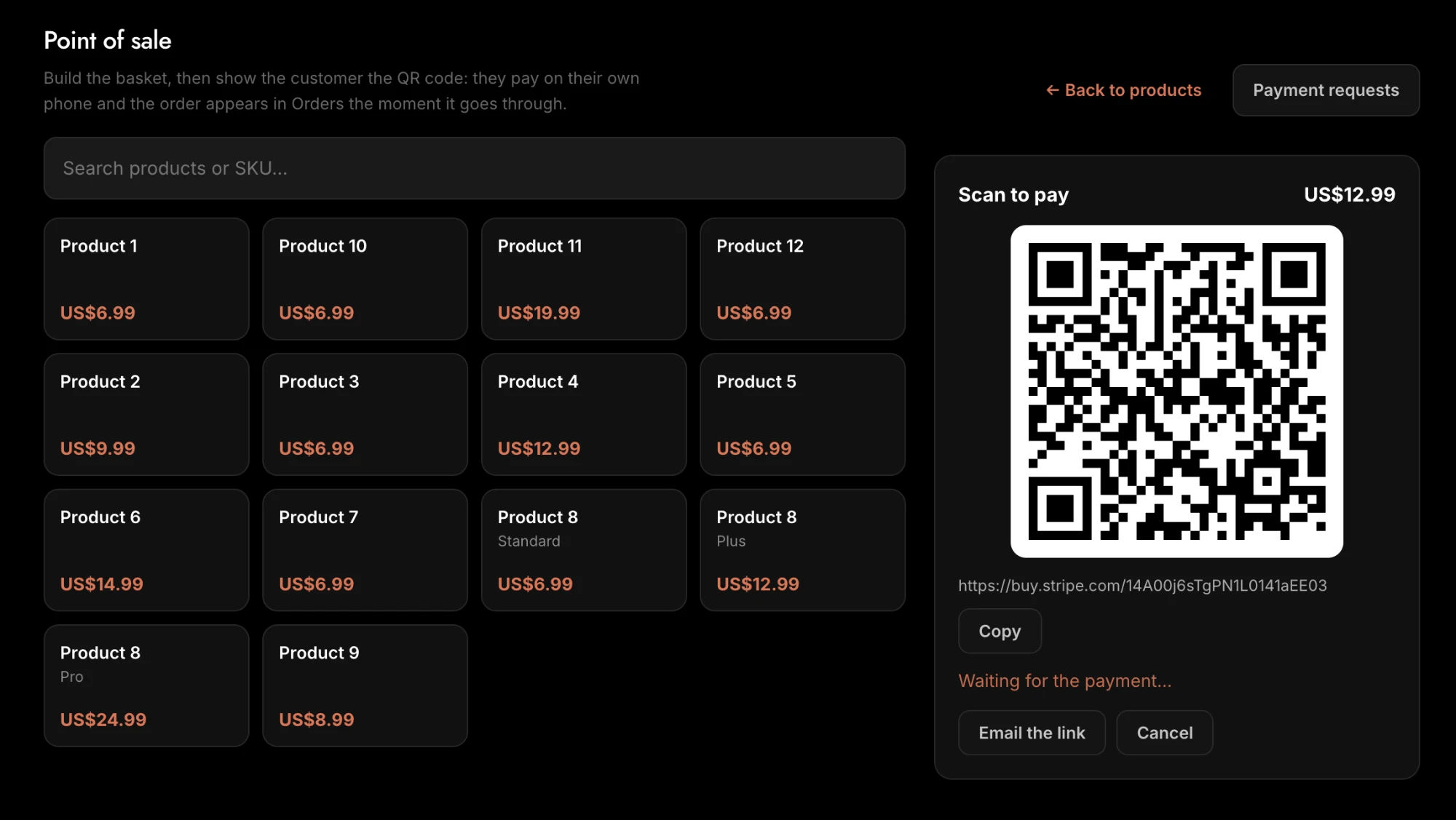
Need to take orders in person? Open the point of sale on a tablet or phone, tap the products into a basket, and show the customer a QR code to pay on their own phone, or email them the payment link instead. The order lands in Orders the moment it is paid. Sales tax isn’t added to in-person payments yet.
Digital downloads from protected PDFs New
Attach a PDF from your Assets to a product on its Advanced tab, and every buyer’s order confirmation carries a download button, with the file attached too when it is small enough to send. Mark the PDF protected and it only downloads from your own site or from the buyer’s own link, which expires after a week.
Google Shopping product feed New
Your products can now go to Google Merchant Center as a feed that keeps itself up to date, with prices, stock, images and barcodes, so they can appear in Shopping results and free product listings. Before the feed switches on, Google Shopping in your store checks for what gets stores rejected, from business details that don’t match to placeholder policy pages, and it checks again every night.
Payments through AI assistants New
When a shopper asks an AI assistant to buy from your store, the assistant can now create a secure checkout for your products at your prices, and the payment arrives in your Stripe account as a normal order. It stays off until you switch on Agents in Your Store, where you also set the most a single payment can be. How paying through an agent works, including the endpoint and OpenAPI spec that agents use.
Australian payments and shipping in the connections vault New
Australia Post and StarTrack, Afterpay, Zip, Shippit, Starshipit and Aramex have been added to the Claude CMS connections vault, with encrypted API key storage and a country filter.
PhonePe, Delhivery and DTDC in the connections vault New
PhonePe payments and Delhivery and DTDC shipping have been added to the Claude CMS connections vault, with encrypted API key storage.
Klarna and Worldpay at checkout New
Two more ways to take payment: shoppers can pay with Klarna, and stores can take cards through Worldpay, in the countries where each operates. Both are built and are being switched on store by store over the coming days.
Ask Claude about your customers New
Who has ordered more than once this month? Which customers have not been back since the spring? Who came in through the contact form and never bought? Claude can read your customers, their orders and the notes against them through the same connection it builds the site with, and answer in plain English — or draft the email to them while it is there.
Your shopfront in French, German, Polish or Indian English New
Choose the language in Business Details, next to currency and timezone, and the shopfront follows: menus, product pages, the bag, the checkout, the filters and the contact form. Prices and dates follow it too — 12,50 € in French and German, 12,50 zł in Polish, and rupees grouped the Indian way at ₹1,23,456.78. English stores are untouched, and British or American spelling still works as before. A new store starts in the language that suits the country you sell from, and you can change it whenever you like.
Notes, stages and lead capture on every customer New
The customer panel now holds what your order history cannot tell you. Write a note after a phone call, record where someone came from, and see everything that has happened with them in one place. Each customer carries a stage, from prospect to customer to repeat customer to lapsed, and it keeps itself up to date: someone who enquires is a prospect, and becomes a customer the moment they order, with nobody editing anything. Set it by hand when you want to and it stays where you put it. Your contact form feeds it directly, so an enquiry becomes a contact in your customer list instead of an email you have to remember, and a Prospect view shows everyone who has asked but not yet bought.
Warehouses and cost prices New
Hold stock in more than one place. Add a warehouse at the foot of Business Details and a Stock by warehouse page appears: receive deliveries into a warehouse, correct counts, and move stock between locations, with every change kept in a ledger. Sales come off your default warehouse and the total customers can buy always adds up. Stores with one warehouse see no change. The product editor also gains a Cost column per variant — what you pay per unit, never shown to customers — as the groundwork for profit reporting. Claude can do all of it too: “receive 40 of the blue mug into Leeds”.
Shop filters New
Shop All gains a filter rail: a price slider, category, brand and product attributes such as skin type or material, each with live counts that update as the customer narrows down. The filters live in the URL, so a filtered view can be bookmarked, shared or linked from a campaign.
Subscription products New
Sell a product as a monthly subscription. Set Billing to monthly in the product editor and the rest follows: the customer is charged at checkout and on that same date every month, a new order is raised for each renewal so it can be shipped like any other, and they can cancel from their account. The storefront shows the monthly terms on the product page, in the bag and on the thank-you page.
Category layouts New
Give a category its own look. Category Settings now has a Layout field, so a storefront that offers more than one category design can show, say, a curated collection as a framed grid with filters while the rest use the standard card grid.
Sub-categories New
Put a category under another, one level deep. A parent page shows its sub-categories’ products automatically, the shop admin lists them as a tree, and Claude can create them by naming the parent.
Customers tab New
Everyone who has bought from you or opened an account, in one table: orders, total spent, last order and country. Click a customer for the full picture, including every address they have used, their subscriptions, order history and returns. Any order links straight to its customer.
Weight units New
Choose grams, kilograms, ounces or pounds in Business Details. Product weights and shipping weight bands are entered and shown in your unit from then on.
Dispatch cutoff in Business Details Improved
The time after which orders ship the next working day now sits with your timezone in Business Details. It still shows on Shipping too.
Wishlist and saved items New
A heart on every product tile and product page saves it to the customer’s account. Saved items appear under My account with add to bag and remove, and anything saved before signing in carries over.
Create an order and send a payment link New
Build an order in the shop admin, add a delivery charge or a note, and email the customer a secure link to pay. The order appears in your list the moment they do, and Payment requests tracks what is open, paid or cancelled.
Ask Claude to run the shop New
Store settings, products and categories can now be changed by Claude through your site connection. "Add a category for gift sets and move these three products into it" just happens.
Recurring revenue in Reports Improved
Stores with subscriptions get a monthly recurring revenue figure alongside orders, revenue and average order.
Customer messages New
Contact-form enquiries and product suggestions from the storefront land in a Messages tab in the shop admin, flagged until you reply. Open a customer and their recent messages sit next to their orders.
Order emails from your own address New
Order confirmations and customer sign-in links can send from your own Google address instead of the platform's, so replies come straight to you.
Storefront SEO Improved
Every storefront page now has a clean URL, with the old .php addresses redirecting permanently. Product pages carry Product structured data with price and availability, every page has a canonical tag, and each store publishes its own robots file and XML sitemap. Filtered category views are noindex,follow unless you opt them in, so search engines see one address per product and only the filtered pages you choose.
Store currency New
Charge in pounds, US dollars, euros, Australian dollars or Canadian dollars. Prices, coupons and reports follow the currency you choose.
UK or US English New
Pick the English your store speaks. The admin and the storefront switch between VAT and sales tax, postcode and ZIP code, county and state.
Category filters with their own URLs New
Filter a category by product attributes, with every filtered view on its own URL. A page such as skincare for dryness can be linked and shared, and switched to indexable when it deserves a place in search results.
Business Details New
Your legal entity, warehouse address and timezone in one place, used on invoices, packing slips and returns labels.
Order search and delivery edits Improved
Find an order by number, name, email, postcode or tracking number, and correct a delivery address or contact detail without touching what was charged.
Subscriptions and member pricing New
Sell recurring plans with checkout on your own site, and offer member-only prices that everyone else sees next to the retail price.
On-site checkout New
Customers pay on your own store page instead of being sent to a hosted checkout. The Stripe Payment Element takes cards and, when switched on in Stripe, wallets such as Apple Pay and Google Pay. The address form collects what carriers need, and nobody leaves your domain.
Connect your Stripe account New
Link your own Stripe account from the Connections tab in your Claude CMS account. Card payments settle to you directly, and the storefront shows a holding notice until Stripe has finished its checks.
Shop admin round-up Improved
Reports from seven days to all time with CSV export, coupons with a minimum spend, shipping zones with rates, weight bands and free-delivery thresholds, categories, custom product options, image descriptions for accessibility, and CSV downloads of your orders.
Shop tab in your Claude CMS account New
Orders, refunds, products and stock, managed from the same account as your website. No separate login.
Platform launch New
Checkout on your own Stripe account with no platform fee, refunds, discount codes, VAT, shipping rates and returns, affiliate links, and passwordless customer accounts.
Affiliate tracking New
Pay partners a commission on the sales they send you. Each affiliate gets a link handle and a commission rate, an order placed through their link records the commission at checkout, and a payout export shows what is owed and what has been paid.
Delivery costs before checkout New
Delivery options and prices can be shown in the bag before checkout, from the same rates the checkout will charge.
Headless commerce API New
Everything the store does is available over a REST API with a per-store key: products and variants, collections, discount codes, delivery rates, checkout, orders, refunds and customers. Build a storefront in any framework, plug it into an existing site, or let Claude build it.
Where the store builder is heading. Everything in this section is planned rather than live — each one moves up into the dated releases above as it ships.
Product reviews and ratings Planned
Customers rate what they bought, and the stars show on the product page and in search results. The request goes out on its own a set number of days after delivery, so reviews accumulate without you chasing anyone.
Bundles and upsells Planned
Sell two things together at a set price, or offer the matching item at the basket. Set it once on the product and it applies everywhere that product appears.
Back-in-stock alerts Planned
A sold-out product offers to let people know when it returns. Receive that stock into a warehouse and everyone waiting is emailed at once, which turns a dead product page into a queue of buyers.
Profit and margin reporting Planned
Cost prices are already recorded against every variant, so reporting can show what you actually made rather than only what you took: margin by product, by category and by month, and which of your best sellers earn the least.
Stock forecasting and reorder points Planned
How long the stock you hold will last at the rate it is selling, and what to order before it runs out. It reads the sales history and the warehouse ledger you already have, so there is nothing to set up.
Multi-currency pricing Planned
Show prices in the customer currency and take payment in it, using rates you set yourself or rates that follow the market. Selling abroad stops meaning a mental conversion at the checkout.
Storefronts in more than one language Planned
The same catalogue served in a second language, translated once and kept beside the original, with the right version shown to the right visitor and each one indexable in its own right.
Bulk product import Planned
Bring a whole catalogue in from a spreadsheet, with a preview of exactly what will be created and changed before a single row is written.
Low stock alerts Planned
Name the level you never want to fall below and you get an email when a line gets close, per warehouse, while there is still time to reorder.
Click and collect Planned
Offer collection from your own address as a delivery choice, with the pickup times you actually open and an email to the customer when their order is ready.
More delivery carriers Planned
Royal Mail and DPD alongside USPS, with labels bought and tracking numbers written back onto the order without leaving the shop admin.
Follow-ups and reminders Planned
Put a task against a customer with a date on it, so the quote you promised on Friday is not the thing you remember on Monday. Work that is overdue surfaces on its own rather than waiting to be looked for.
One timeline per customer Planned
Orders, enquiries, replies, notes and the emails your store has sent, in one list in the order they happened. Today they sit in separate places; next they read as a single story, so you can see what was said before what was bought.
Quotes and a simple sales pipeline Planned
For anyone who quotes before they invoice: an enquiry becomes a quote with a value and an expected close date, moves through stages you can see at a glance, and when it is won it turns into a payment link and then a real order. The far end of that chain already exists, so nothing is bolted on.
Import and export your contacts Planned
Bring a spreadsheet of customers in, and take the whole list out again whenever you like. Your data stays yours, and moving over from another system stops being a reason not to.
Enquiries straight from your inbox Planned
Copy your store address into any email and the conversation lands against the right customer by itself, so the record fills in whether someone uses your contact form or simply writes to you.
Updates are added as they ship. Want something that is not here yet? Tell us, or ask Claude for it in your next session. Running the site as well as the shop? There are separate release notes for the CMS.
eCommerce — What’s New
Every release in the store builder: checkout, shipping, payments, stock and the Shop tab, newest first.
This pageContent — What’s New
What changed in the CMS itself: pages, blocks, connectors, hosting and the account, newest first.
Open →Help Centre
Step-by-step guides for setup, your store, domains, content, connections, emails, security and hosting.
Open →